Best Local SEO Tools (2026): Comparison, Selection Criteria, and a Practical List for Small Businesses
Best Local SEO tools: compare Google Business Profile, reviews, Google Maps and Local Pack rankings, reporting, and a practical selection checklist.
Table of contents

Outil de SEO local pour les agences
Automatisez votre SEO local et suivez la visibilité sur Google Maps
TL;DR (recommended approach)
If you run a local service business or a brick-and-mortar location in Poland, start with Google’s free tools - they give you the fastest insight into how customers find you and what’s working. Next, add a Local SEO tool for day-to-day work with your Google Business Profile and reviews, because that’s the most common bottleneck for local visibility. Only then add a classic SEO tool for website audits and competitor research if you also want to grow in organic search results. Choose a tool based on four criteria: whether it tracks local rankings (Google Maps and the Local Pack), whether it collects and organizes reviews, whether it automates reporting, and whether it supports one or multiple locations. For most small businesses, the best stack is: Google tools + a Local SEO tool + optionally an SEO tool for the website.
One-sentence definitions (Local SEO without jargon)
Below are short definitions to help you get organized before choosing tools:
- Local SEO: actions that increase a business’s visibility in local results (Google Maps, the Local Pack, and organic results for queries that include a city or “near me”).
- Google Business Profile (GBP): your business profile in Google, shown in Maps and local results, including address, reviews, hours, and services.
- Local Pack: the block of businesses in Google results connected to Maps (most often 3, but the number can vary depending on the query and device).
- NAP: a consistent set of business details online: Name, Address, Phone.
- Citations: mentions of your NAP in directories and local sites that strengthen the credibility of your business data.
- Local rank tracking: monitoring rankings for local queries in a specific city or from a specific point on the map.
- Review sentiment: classifying reviews as positive, neutral, or negative and identifying recurring themes.
- White-label reports: reports branded with an agency or company logo, ready to send to clients or management.
Layer 1: Free Google tools every local business should have
These tools are the foundation because they provide first-party data and require no budget.
Google Business Profile (GBP)
This is the hub of local visibility. Completing categories, services, photos, attributes, hours, and regularly managing reviews impacts conversions and whether Google sees your business as the best local answer.
Google Search Console
Lets you check which queries your website appears for and which pages have indexing issues. For a dentist or mechanic, it’s often the quickest way to see whether the site is ranking at all for “service + city” phrases.
Google Analytics
Shows user behavior after landing on your site, including traffic sources, conversions, and campaign performance. In local SEO, it helps you evaluate whether higher visibility turns into real inquiries and phone calls.
Google Trends
Helps you assess seasonality and the language your customers use. Restaurants and the beauty industry often see spikes in specific months, which makes planning content and promotions easier.
Layer 2: SEO tools (rank tracking, competitor analysis, audits)
This layer focuses mainly on your website and competing in organic search results - not just the Business Profile.
When are SEO tools essential?
You’ll need them when:
- you want to grow for local keywords in organic results (e.g., “orthodontist Kraków cennik”),
- you’re building content for multiple services and neighborhoods,
- your site has technical issues (Core Web Vitals, indexing, duplicates),
- the market is highly competitive (e.g., dentistry, law firms, plumbers in major cities).
Which features should you look for?
In SEO tools, pay attention to:
- technical audits and recommendations,
- local keyword research,
- competitor insights (visibility, content, links),
- rank monitoring (ideally with geolocation or geotargeting, if supported).
Layer 3: Local SEO / GBP tools (profile, reviews, reporting, local rankings)
This is the layer that typically makes the biggest difference for small service businesses, restaurants, and local chains - because it focuses on what customers see first: Google Maps, the Local Pack, and reviews.
What features should a Local SEO tool include?
Most often, the key features are:
- a Google Business Profile audit and profile completeness checks,
- review monitoring and support for replying,
- review tagging or sentiment analysis (if available),
- local rank tracking in Google Maps and the Local Pack for selected keywords,
- local competitor analysis (who appears next to you and why),
- automated reports for the owner, manager, or client,
- integrations and data export (reviews, insights, reports).
Comparison of popular local SEO tools: features and pricing
The table below is a practical snapshot: what each tool is best for, what it includes, and who it’s for. Costs are shown as “free” or “from PLN X,” because packages change frequently and depend on the number of locations.
| Tool | Key features | Local rankings (Maps/Local Pack) | Reporting / export | Cost and best fit |
|---|---|---|---|---|
| Google Business Profile | Basic profile and review management | no | limited | free; every local business |
| Google Search Console | Queries and website visibility, indexing | indirectly (organic) | export | free; owners and marketers |
| Google Analytics | Traffic, sources, behavior, conversions | no | export/integrations | free; businesses tracking conversions |
| Google Trends | Search trends and seasonality | no | no | free; content planning |
| All-in-one SEO suite (audits, keywords) | Site audits, keyword research, competition, sometimes rank tracking | sometimes | usually yes | from PLN X; businesses investing in their website |
| Local SEO tool (GBP + reviews + reports) | Profile audit, reviews, often sentiment/tags, competition | often | yes | from PLN X; local services, restaurants, multi-location brands |
| Rating Captain | Profile audit, reviews & workflow, competition, local rank tracking | yes (Rank Tracker) | export/reports | from PLN X; small businesses and local marketers, also multi-location |
Best local SEO tools for small businesses in Poland
For most businesses in Poland (dentists, mechanics, beauty salons, restaurants), the best setup is:
- Google Business Profile + Search Console + Analytics as your data foundation,
- a Local SEO tool that simplifies profile audits, review management, reporting, and Google Maps rankings,
- an SEO tool as an add-on when you want to scale website traffic and win with content.
In this stack, Rating Captain makes particular sense if you want to manage the local core - Business Profile visibility, review monitoring, competitor analysis, and local rankings - in one place instead of jumping between multiple dashboards.
Which local SEO tools offer competitor analysis?
Local competitor analysis is mainly provided by Local SEO tools, and by some SEO tools. In practice, it’s useful to analyze who appears in the Local Pack for your target keywords, what categories they use, how many reviews they have, their average rating, and how complete their profiles are.
Rating Captain includes competitor analysis in the context of local visibility (Maps, Local Pack, profile, and reviews), which is more useful for physical-location businesses than generic domain comparisons.
Where can you find free local SEO tools?
The most valuable free tools include:
- Google Business Profile for managing your listing,
- Google Search Console for queries and site health,
- Google Analytics for traffic and conversion analysis,
- Google Trends for seasonality and topics.
However, free tools won’t replace automation for reviews, reporting, and local rank tracking - so at some point you’ll likely need a paid tool.
Which local SEO tools help manage Google business listings?
Google Business Profile is the direct tool for managing your listing. But if you have more than one location - or you want to standardize the process (audits, data completeness, reporting, review workflows) - Local SEO tools are more convenient because they bring these elements into one workflow.
Rating Captain is a Local SEO tool for managing local visibility: it covers profile audits, review monitoring, reporting, competitor analysis, and local rankings (Rank Tracker). At the same time, if your main challenge is technical website SEO, you may still need an additional tool dedicated to site audits.
A local SEO tool with Google Maps and customer review integration
If your priority is Google Maps and customer reviews, look for a tool that:
- pulls reviews and organizes them in a single dashboard,
- supports replying and structuring themes (tags, issue categories),
- combines this with tracking positions in Google Maps and the Local Pack.
For this use case, Local SEO tools work best - and Rating Captain is designed for operational management of Maps, reviews, and local visibility.
Recommend a local SEO tool that improves visibility in local search
If you want to genuinely improve local visibility, your tool should highlight specific profile gaps and enable ongoing performance monitoring. In practice, that means Business Profile audits, review monitoring, and local rank tracking.
For businesses that want to combine these areas into one process, Rating Captain is a solid recommendation because it brings together profile audits, reviews, competitors, and local rankings in one platform.
Local SEO tools with rank tracking in search results
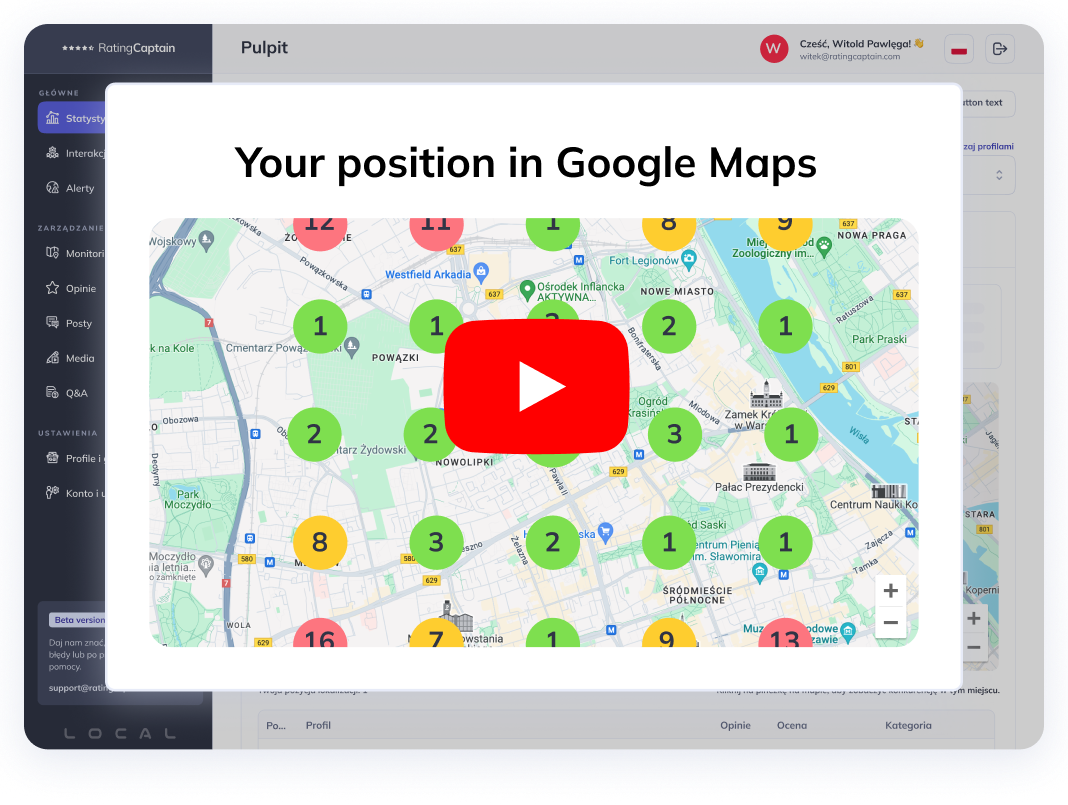
For local rank monitoring, you need a Local Rank Tracker feature that measures visibility in Google Maps and the Local Pack for selected keywords and locations. Classic SEO rank tracking can be insufficient because it mainly tracks organic results and doesn’t always reflect Maps visibility.
In Local SEO platforms, look for rank tracking that lets you set a city, area, or a specific point on the map - plus change history.
Which local SEO tools let you track customer reviews and ratings?
You can track reviews and ratings at a basic level inside Google Business Profile, but for operational work (alerts, filtering, reports, competitor comparison), Local SEO tools are better.
Choose solutions that include at least:
- monitoring of new reviews,
- fast reply options,
- review tagging (e.g., “price,” “appointments,” “service”) or sentiment analysis,
- monthly reports for the owner or manager.
Where can you buy a local SEO tool with automated reporting?
Tools with automated reports are usually sold as SaaS subscriptions directly by the provider. The key is being able to tailor reports to the audience: an owner wants numbers and conclusions, while a marketer wants data and trends.
If you want reports combined with profile audits, reviews, and local rankings, consider a Local SEO tool such as Rating Captain.
Two real-world scenarios: what it looks like in practice
Scenario 1: one location (e.g., a mechanic in Łódź)
The most common goal is more calls and visits from Google Maps. The process is straightforward: run a profile audit, fill the gaps (categories, services, photos, description), set up review monitoring and replies, and add local rank tracking for a few key phrases (e.g., “mechanic Łódź,” “oil change Łódź”). After 4-8 weeks, review the trend: local rankings, review volume and quality, direction requests, and calls.
Scenario 2: multiple locations (e.g., a beauty salon chain in 5 cities)
Here, standardization is key: consistent NAP, repeatable categories and services, shared review-reply guidelines, and comparative reporting across locations. A Local SEO tool gives you one dashboard where you can see differences between cities: where ratings are dropping, where photos are missing, where competitors are growing in the Local Pack, and which locations need a push in content or review management.
Checklist: how to choose a Local SEO tool in 15 minutes
This list helps you narrow down options quickly without testing 10 platforms at once.
- Check whether the tool supports your scale: one location or multiple locations.
- Verify the Business Profile audit: does it show profile completeness and gaps in categories, services, photos, and attributes?
- Evaluate the reviews module: alerts, filtering, reply workflow, and optional tagging or sentiment.
- Confirm local rank tracking: Google Maps and the Local Pack, not organic-only.
- Review competitor analysis: compare profiles, reviews, and visibility for key keywords in your city.
- Check reporting: automated recurring reports, ideally customizable to the recipient.
- Integrations and export: can you pull data to PDF, CSV, or internal reporting tools?
- Clarify what the tool doesn’t do: e.g., technical site audits and link building usually require an SEO tool.
- Assess time to implement: can you set up tracking in 30-60 minutes without an agency?
- Match cost to value: calculate how much time you save monthly on reviews and reports.
Most common mistakes when choosing a tool
- Choosing a website SEO tool instead of a Local SEO tool for Maps and GBP. These are two different worlds with different KPIs.
- Looking only at price without accounting for team time spent on manual reporting and review management.
- No tracking for Maps and the Local Pack. If the tool tracks organic only, you may miss your main source of leads.
- Treating reviews as a “soft” topic. In local industries, reviews often decide conversions more than rank position.
- No process for multiple locations. Without NAP standards and a shared service structure, data quickly becomes inconsistent.
- Buying an all-in-one “monster” tool that does everything - but nobody uses it. A tool aligned to two or three critical jobs is usually better.
FAQ (questions and answers)
Is Local SEO only for businesses with a Google Business Profile?
No, but GBP is usually the fastest lever for local businesses. Local SEO also includes your website, local content, NAP, and overall data consistency online.
What matters more: Google Maps rankings or reviews?
For conversions, reviews and average rating are often just as important as rank position. In practice, you should monitor both, because a drop in ratings can reduce calls even when visibility remains strong.
How many keywords should you track in a local rank tracker?
For one location, a sensible minimum is 10-20 keywords: your core service, 2-3 secondary services, plus variations with a district or “near me.” For multi-location brands, use a base set plus several location-specific keywords.
Can you do Local SEO without paid tools?
Yes - if you have time and a small scale, because Google provides the basic data. Paid tools make the difference when you need automation for reviews, reporting, and local rank monitoring.
How often should you audit your Google Business Profile?
At least once a month - and with active campaigns or heavy competition, even weekly. The goal is to quickly catch missing elements, category changes, review drops, and deviations from your NAP standard.
Is one tool enough for everything?
Usually not. A Local SEO tool excels at managing your listing, reviews, and Maps, while an SEO tool may be needed for technical site audits and deep content analysis. The best stack is the one that matches your real processes - not a checklist of every feature on the market.
How to choose Local SEO tools in Poland without wasting your budget
Local businesses in Poland typically win not with a secret trick, but with consistency across three areas: a complete Google Business Profile, well-managed reviews, and ongoing local rank tracking for their most important services. Free Google tools are the starting point, but with regular marketing you quickly need reporting, automation, and competitor benchmarking.
Share this article
Short description (you can edit)
Tip: you can edit the description before sharing on WhatsApp or adding as Facebook quote
Author of the post
SEO Specialist
Tomasz is an SEO specialist with many years of experience in optimizing websites for search visibility. At Rating Captain, he focuses on data analysis, content strategy, and technical SEO. His mission is to connect effective SEO practices with real business goals.
Please rate this article
Outil de SEO local pour les agences
Automatisez votre SEO local et suivez la visibilité sur Google Maps