n8n vs Make: The Ultimate guide to automation in 2025

Table of contents

Try our new
Local SEO tool
Manage and track visibility of your
Google Business Profiles
Automation has become a cornerstone of modern businesses, helping teams save time, reduce errors, and streamline workflows. In 2025, platforms like n8n and Make continue to dominate the automation space. But how do you decide which automation tool or workflow automation platform is right for your business? This article explores the differences, benefits, and limitations of n8n vs Make, helping you make informed decisions about automation, AI features, and workflow integration.
Whether you are a developer, an operations manager, or a business owner, understanding the nuances of these platforms will help you automate complex workflows and leverage AI agents effectively.
1. What is n8n? Understanding the platform
n8n is an open-source workflow automation tool designed for users who want to automate tasks without being limited by a no-code automation platform. Unlike cloud-only tools, n8n gives users the flexibility to self-host n8n or use n8n cloud for easy deployment.
The platform supports a wide range of integrations, connecting with popular AI solutions, Zapier, databases, and APIs. By using nodes, you can create sophisticated automation scenarios that handle repetitive tasks, data processing, and multi-step workflow automation.
One of the main advantages of n8n is its flexibility. For power users or developers, it provides advanced options like custom AI solutions, complex conditional logic, and direct API calls. At the same time, beginners can leverage its intuitive visual automation interface.
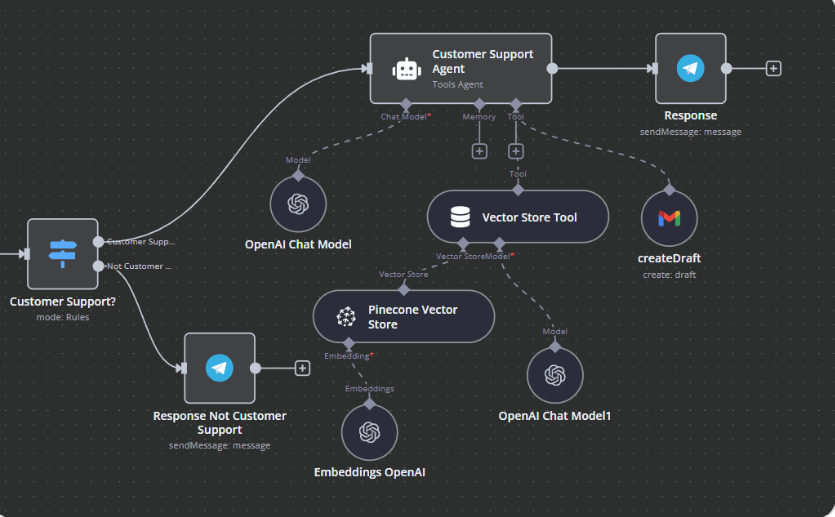
n8n RAG AI agent workflow
2. How n8n stands out in workflow automation?
n8n focuses on giving users full control over their automation. Unlike platforms that are fully managed, n8n also offers the ability to self-host n8n, which is perfect for businesses with strict data compliance needs.
In terms of workflow automation, n8n lets you chain multiple nodes together, making it possible to automate highly customized processes. Whether you are building an AI agent to handle customer inquiries or a workflow that syncs data across CRMs, n8n takes flexibility seriously.
Furthermore, n8n is a great fit for teams that require custom AI solutions or want to integrate with multiple platforms like n8n. Unlike simpler automation tools, n8n can manage complex workflow automation without the limitations of fixed templates.
“Automation and AI are no longer optional, they’re essential. Platforms like n8n enable businesses to customize workflows, integrate deeply with existing systems, and create intelligent processes that evolve with their needs.”
– Mateusz Piwnicki, CEO Rating Captain
3. n8n vs Make: core differences explained
When comparing n8n, Make is often the first alternative that comes to mind. Both platforms allow users to automate workflows, but their design philosophies differ. n8n is designed for flexibility and open-source control, while Make is a no-code platform built for cloud deployment and ease of use.
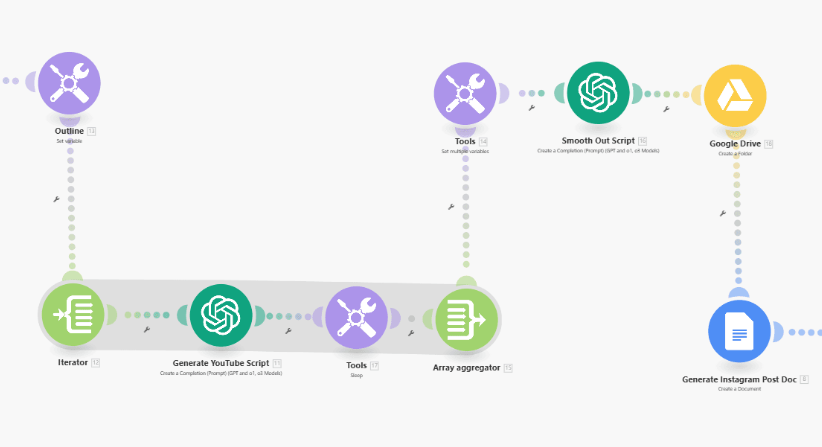
Make.com AI workflow
Make excels in user-friendly interface design and pre-built templates. For beginners or teams without coding experience, Make lets users quickly build workflow automation. On the other hand, n8n stands out for developers and power users who want to fine-tune automation scenarios.
In terms of AI, n8n vs Make shows subtle differences. While Make also offers AI integrations, n8n gives developers the ability to integrate AI models directly into workflows, allowing for custom AI solutions.
4. Is n8n the best automation tool for 2025?
Looking ahead to 2025, automation needs are evolving. Businesses are increasingly looking for platforms that combine workflow automation, AI features, and robust integration capabilities. n8n is an open-source platform that is flexible enough to handle these emerging requirements.
n8n makes it easier to automate complex business processes and scale with growing automation needs. Additionally, the platform supports AI agents, enabling automation that can adapt and learn over time. For companies looking to adopt powerful automation strategies, n8n is a great fit.
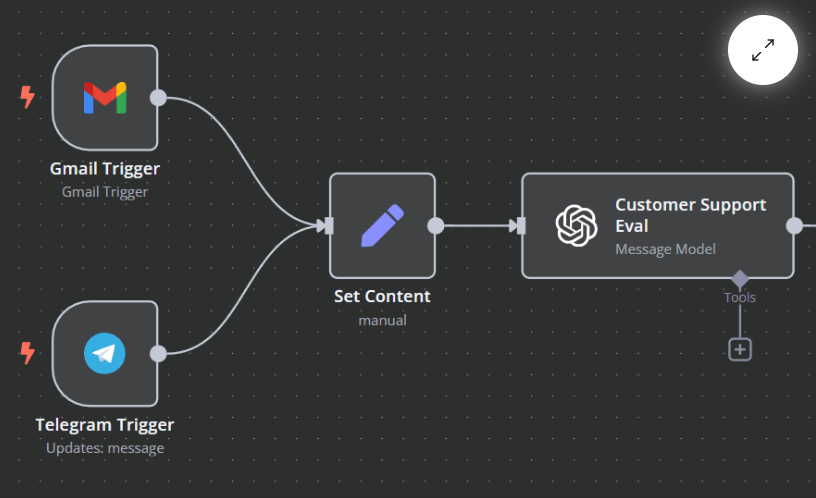
n8n workflow with multiple triggers
However, the choice depends on your team’s technical expertise. Self-hosting n8n gives ultimate control, but it may require a steeper learning curve than cloud-based platforms like Make or Zapier.
5. Pricing Models: n8n vs Make vs Zapier
Pricing is a critical factor when choosing an automation platform. n8n charges differently depending on whether you choose managed n8n or self-hosting n8n. Self-hosting allows businesses to self-host n8n at no cost beyond infrastructure, while the cloud version includes additional support.
Make’s pricing is subscription-based, and Make takes a usage-based approach. Make also offers a free tier with limitations on tasks and operations. Zapier is similar but often more restrictive in terms of integration capabilities.
Choosing between n8n and Make often comes down to the pricing model versus the level of control and integration flexibility required. For businesses with frequent automation scenarios, n8n gives more value in terms of customization, while Make provides convenience for simpler tasks.
6. How integrations work in n8n and Make?
Integration is the backbone of any workflow automation tool. n8n and Make talk to a wide variety of platforms, including CRMs, databases, and cloud apps. n8n lets you create integrations via nodes, enabling conditional logic and branching workflows.
Make uses a visual approach, with drag-and-drop interface elements that simplify building workflows. For teams that require sophisticated automation, n8n gives more options to connect directly to APIs and implement custom AI solutions.
The ability to integrate AI is particularly important in 2025. Platforms like n8n allow the creation of AI agents that can respond to customer inputs, analyze data, or automate marketing campaigns without manual intervention.
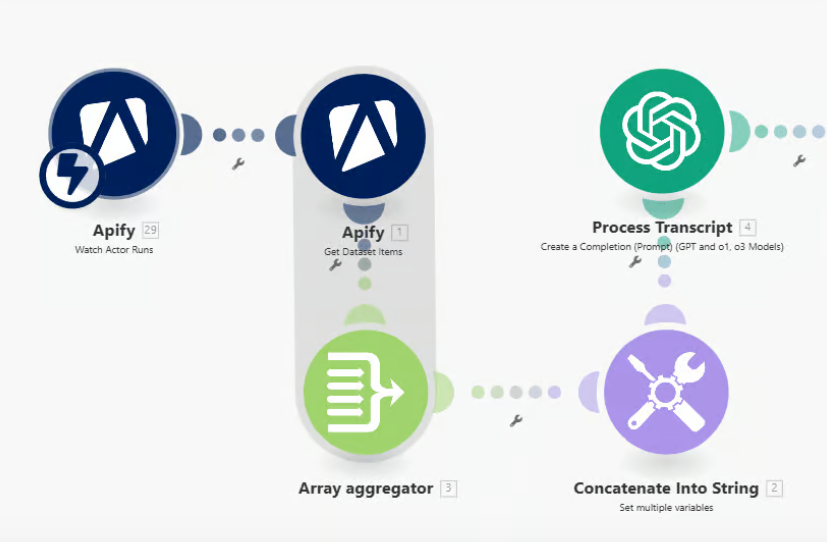
Make.com single-trigger workflow
7. AI Features in n8n and Make: What you can expect
n8n focuses on flexible AI features. You can integrate custom AI models or use pre-built popular AI services to enhance your workflow automation. n8n also supports AI agents, which can handle tasks like email classification, customer support, or predictive analytics.
Make ai tools are designed to be user-friendly, letting teams leverage AI without coding knowledge. Make gives access to AI integrations, but n8n vs Make demonstrates that n8n is better suited for highly customized AI-driven automation scenarios.
AI solutions in n8n can be tailored, allowing organizations to automate sophisticated processes that were previously impossible with standard no-code automation platforms.
8. Managed n8n vs Self-Hosting: which should you choose?
One of n8n’s unique advantages is flexibility in deployment. With managed n8n, you get a cloud-hosted version with simplified setup and maintenance. This option is ideal for teams that want to focus on workflow automation rather than server management.
Self-hosting n8n offers full control and customization. For companies concerned about data privacy, this is invaluable. n8n lets developers adjust nodes, integrate custom AI solutions, and manage infrastructure according to internal policies.
The choice between managed n8n and self-hosting depends on your team’s technical resources and automation needs. Both options retain access to sophisticated automation and extensive integration possibilities.
9. Choosing Between n8n or Make: Questions to ask
When choosing between n8n and Make, consider the following questions:
-
Do you need custom AI solutions or simple task automation?
-
Will your team benefit from a no-code automation platform, or are you comfortable with self-hosting n8n?
-
How important is pricing flexibility versus integration depth?
-
Do you need AI agents capable of sophisticated workflows?
Answering these will clarify whether n8n or Make is more suitable. n8n stands out for developers and teams that need full control, while Make is designed for rapid deployment and easy workflow automation.
10. Future of automation platforms like n8n in 2025
As we move further into 2025, automation platforms like n8n are evolving to integrate AI agents, predictive analytics, and more sophisticated automation features. n8n also offers open-source flexibility, ensuring businesses can adapt workflows to new challenges.
Platforms like n8n and Make are becoming indispensable for competitive businesses. By understanding how n8n gives control over integration, AI features, and workflow automation, you can make smarter choices for your business strategy.
The future will likely emphasize custom AI solutions, hybrid deployment options, and deeper integration with popular SaaS tools. Businesses that invest in n8n or similar automation tools today will be better positioned to scale efficiently in the years ahead.
FAQ: n8n vs Make - the ultimate automation guide for 2025
What is n8n?
n8n is an open-source workflow automation tool that gives you full control over your processes. You can self-host it or use the cloud version. It supports AI, databases, APIs, and many other integrations.
What makes n8n stand out in workflow automation?
-
Create advanced, multi-step workflows.
-
Support for custom AI solutions.
-
Perfect for teams needing full control and flexibility.
n8n vs Make – Key Differences:

Is n8n the best automation tool for 2025?
n8n excels in complex processes and AI-driven automation but has a steeper learning curve than Make or Zapier.
Pricing: n8n vs Make vs Zapier:
-
n8n: free self-hosting (infrastructure cost only) or paid cloud version with support.
-
Make: subscription-based, free tier with task limits.
-
Zapier: similar to Make but with more limited integrations.
How do integrations work?
-
n8n: integrations via nodes – conditional logic, API connections, custom AI workflows.
-
Make: drag-and-drop interface, easy and fast workflow building.
AI in n8n and Make:
-
n8n: supports custom AI models and AI agents for automated responses, customer support, and predictive analysis.
-
Make: beginner-friendly AI integrations, less suitable for advanced automation scenarios.
Managed n8n vs Self-Hosting:
- Managed (cloud): easy setup, no server management.
- Self-hosting: full control, better data privacy, customizable AI solutions.
9. How to choose between n8n and Make:
Ask yourself:
-
Do you need advanced AI or simple task automation?
-
Can your team self-host n8n?
-
What matters more: integration flexibility or ease of use?
-
Do you need AI agents for complex workflows?
10. The future of automation in 2025:
-
More AI agents, predictive analytics, and SaaS integrations.
-
Open-source platforms like n8n provide full control and scalable workflows.
-
Businesses leveraging advanced automation will gain a competitive edge.
Bibliography
https://www.creativeadvisor.com/automation/n8n-vs-make
https://ai-task-automation.com/blog/n8n-vs-make
https://skywork.ai/blog/ai-agent/n8n-vs-make-2025-workflow-automation-comparison
https://cybernews.com/ai-tools/n8n-vs-make/
https://www.make.com/en/blog/make-vs-n8n
https://be-efficient.co/make-com-vs-n8n-workflow-automation-in-2025
https://elloai.com/make-com-vs-n8n
Share this article
Short description (you can edit)
Tip: you can edit the description before sharing on WhatsApp or adding as Facebook quote
Author of the post
Local SEO Specialist
Oskar specializes in local SEO and Google Business Profile optimization. He helps companies increase their visibility on Google Maps and in local search results. At Rating Captain, he develops strategies that help brands dominate local searches.
Please rate this article
Try our new
Local SEO tool
Manage and track visibility of your
Google Business Profiles