Zapier vs Make: a deep dive into automation capabilities
When evaluating Zapier vs Make, it’s important to look beyond surface-level features and understand how each platform handles workflow automation, AI workflows, and complex automation.
Table of contents

Supera a la competencia con Google Maps
Gestiona y rastrea la visibilidad de tus Perfiles de Negocio de Google
When evaluating Zapier vs Make, it’s important to look beyond surface-level features and understand how each platform handles workflow automation, AI workflows, and complex automation.
Zapier is designed for speed and simplicity. Its user interface is intuitive, allowing users to automate tasks without writing code. The platform shines with pre-built Zaps, which are ready-made automation workflows connecting multiple apps. Zapier is often the first choice for businesses looking to automate basic tasks, like syncing emails to a CRM, posting social media updates, or transferring data between spreadsheets. Its ease of use and minimal setup time make it ideal for new to automation users.
Make, on the other hand, caters to power users who need more control. Its scenario-based workflow automation allows for branching logic, data transformation, and conditional operations that are difficult to achieve in Zapier. While Make offers a steeper learning curve, it gives more flexibility to automate complex workflows, making it suitable for enterprises or teams managing large-scale automation projects. Make also supports AI workflows and advanced API integrations, which enhances its versatility compared to Zapier.
"Simple tasks? Zapier. Complex flows? Make."
– Karol Bocheński, CMO in Rating Captain
Workflow complexity: Make and Zapier
Another critical factor when comparing Zapier vs Make is workflow complexity.
Zapier handles simple and multi-step Zaps well but can struggle with highly complex workflows involving multiple conditional paths or loops. Users may need to break down complicated processes into separate Zaps, which can lead to inefficiencies. Zapier’s task limit on paid plans can also constrain automation if your workflows trigger hundreds or thousands of actions daily.
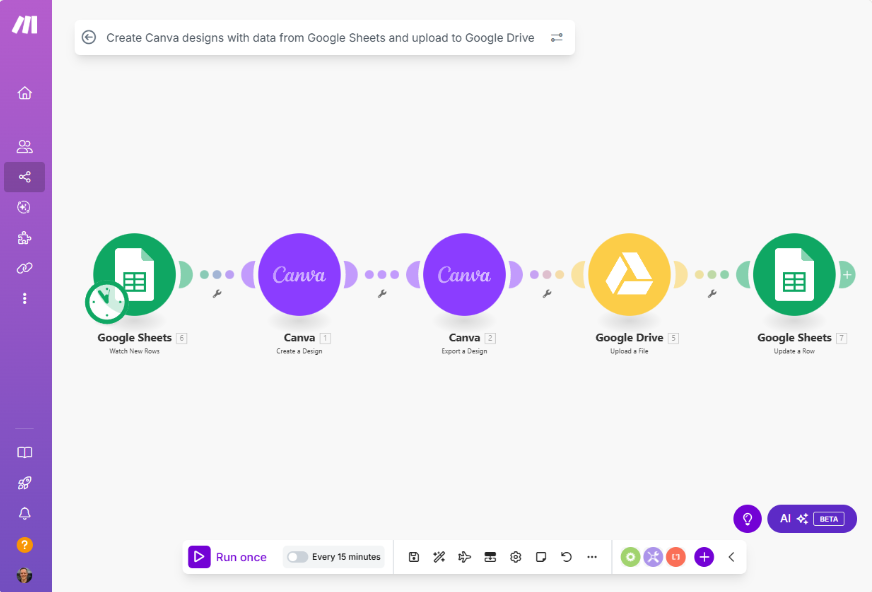
Make, conversely, is designed for complex automation. With its visual builder, users can create workflows that include branching, data mapping, scheduling, and conditional logic. This makes Make ideal for scenarios where workflow automation requires data transformation or connecting apps in non-linear ways. Although Make has a steeper learning curve, it’s unmatched for users who need advanced automation capabilities.
Pricing and cost-effectiveness of automation tools: Zapier vs Make
Pricing is a practical consideration when choosing between Zapier and Make.com. Zapier’s pricing model is based on the number of tasks you run per month, which can add up quickly if your team relies heavily on automation. Paid plans provide more tasks and access to premium apps, but for some businesses, these costs can be high relative to the complexity of workflows.
Make, in contrast, is often seen as more cost-effective for advanced users. Make is cheaper for scenarios requiring complex automation with high-volume tasks. The platform’s pricing structure allows more operations per month, making it attractive for power users and companies that need intensive automation. Evaluating cost-effectiveness in relation to the required workflow complexity is key when deciding which platform to adopt.
Zapier vs Make: Integration and AI app support
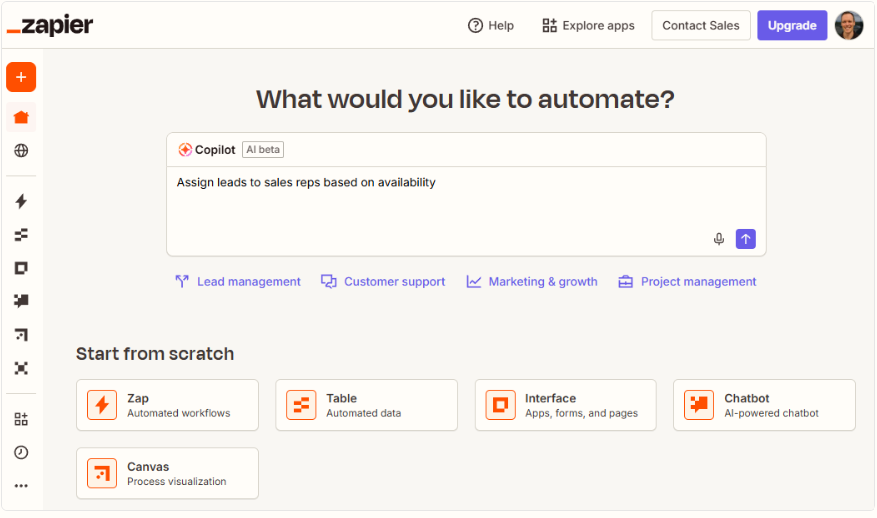
Zapier integrates with over 5,000 apps, which is one of its major advantages. From Gmail and Slack to Salesforce and Shopify, Zapier allows users to automate tasks across multiple platforms without leaving the tool. This makes it ideal for businesses looking for ready-to-use automation with minimal setup.
Make also supports a wide range of integrations, but its strength lies in custom API connections and more advanced app integrations. Make lets users connect apps while performing complex data operations, enabling more tailored workflows than Zapier. However, the setup may take longer, and non-technical users may face a steeper learning curve.
Key differences: Zapier and Make in 2025
Ultimately, the Zapier vs Make decision depends on your team’s needs:
-
Choose Zapier if you want ease of use, quick automation without coding, and a wide library of pre-built Zaps for common workflows.
-
Choose Make if your workflows require branching logic, data transformation, advanced API integrations, or complex automation scenarios.
For businesses evaluating Zapier and Make.com, the choice comes down to balancing workflow complexity, cost-effectiveness, and ease of use. Many organizations even use both: Zapier for simple, day-to-day automations and Make for advanced, enterprise-level workflows.
FAQ
1. Zapier or Make. What’s the real difference?
Zapier = speed & simplicity.
Make = power & complexity.
2. Which one is easier?
Zapier. You click → it works.
3. Which one is more powerful?
Make. Branching, loops, data mapping, advanced API magic.
4. Which is better for complex workflows?
Make. It’s built for heavy, non-linear automation.
5. Which one is cheaper at scale?
Make. More operations, lower cost.
6. Who has more integrations?
Zapier (5,000+ apps).
Make wins only when you need custom API control.
7. Which is better for AI workflows?
Zapier for quick setup,
Make for advanced AI logic & data flows.
8. What should I pick in 2025?
-
Zapier → fast, simple, plug-and-play.
-
Make → advanced, flexible, technical.
9. Can I use both?
Yes. Many companies do:
Zapier for simple stuff, Make for the heavy lifting.
Bibliography
https://zapier.com/blog/zapier-vs-make/
https://www.make.com/en/blog/make-vs-zapier
https://www.technicalrevops.com/comparisons/zapier-vs-make-comparison
https://aiworkshop.info/blog/tools/make-vs-zapier-ai-automation
https://integrately.com/blog/zapier-vs-make-pricing
Share this article
Short description (you can edit)
Tip: you can edit the description before sharing on WhatsApp or adding as Facebook quote
Author of the post
Local SEO Specialist
Oskar specializes in local SEO and Google Business Profile optimization. He helps companies increase their visibility on Google Maps and in local search results. At Rating Captain, he develops strategies that help brands dominate local searches.
Please rate this article
Supera a la competencia con Google Maps
Gestiona y rastrea la visibilidad de tus Perfiles de Negocio de Google